

WooCommerce Speed Optimization Services for Faster Stores
A slow online store can frustrate shoppers before they see a product. Inconsistencies during the checkout process can lead to cart abandonments more quickly. WooCommerce Speed Optimization Services enhance store…
A slow online store can frustrate shoppers before they see a product. Inconsistencies during the checkout process can lead to cart abandonments more quickly. WooCommerce Speed Optimization Services enhance store performance without compromising on ecommerce functionalities.
WooCommerce stores often include more moving parts than standard websites. The product images, payment gateways, extensions, filters, tracking tools, and customer accounts require resources. Subsequently, performance issues may appear over time when a shop expands.
Speed improvement involves more than just quicker page load times. This also involves a more coherent browsing experience between the product pages, the cart, and the checkout screen. A responsive store makes it easy for customers to navigate quickly.
As your business grows, performance influences customer satisfaction, operational efficiency, and more. Consequently, speed optimization is an important aspect of long-term WooCommerce.
Importance of WooCommerce Performance Optimization
Constantly Update Website with Dynamic info. The availability of products, cart contents, prices, shipping options, and customer sessions may vary. Consider making ecommerce stores more demanding than a simple informative site.
A shop can do well at first with a small catalog. More plugging, image libraries and features increase processing in powerful hardware and server. Performance issues tend to emerge during periods of peak traffic or promotion.
There can be various reasons for slow speed. Large images can increase the weight of the page, and poorly configured extensions can generate useless database activity. Important content can also be delayed by external scripts.
Hosting conditions of technical significance matter too. The speed at which requests get processed can vary based on server resources, caching settings, database health, and software versions. A fast theme cannot fully compensate for weak infrastructure.
| Performance Area | Common Problem | Optimized Approach |
| Product Images | Oversized files | Properly compressed and sized images |
| Plugging | Excessive or conflicting extensions | Only necessary, well-maintained tools |
| Database | Accumulated unnecessary data | Regular cleanup and efficient queries |
| Caching | Limited or incorrect setup | Store-aware caching configuration |
| Checkout | Slow scripts and requests | Streamlined transaction process |
The full performance optimization of WooCommerce does not look at one single measure. All components should enable reliable shopping without introducing unnecessary processing overhead.
Which 8 focuses on building sustainable organizations
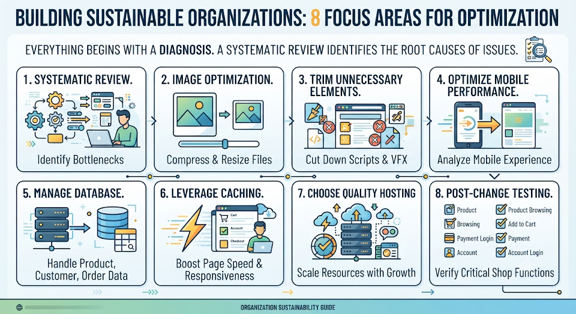
Everything begins with a diagnosis. If the root cause of your issue is unknown, then simply deleting random plugins or changing some settings can create more problems rather than solving the actual issue. A systematic review shows you where the delays are.
Website Speed
What shoppers experience directly is affected by front-end performance? The weight of the page is determined by product photography, theme files, fonts, scripts and VFX. The careful management of these elements is required.
Most ecommerce stores display several product-related images which is why image handling must be taken special care of. Files should be clear enough to aid purchasing decision but not too large.
Themes may also add additional scripts and styles. A rich theme can bring in functionalities not used by the store. Eliminating unnecessary elements can lessen the browser’s workload.
Front-end Enhancements that Matter:
- Properly compressing and resizing product images.
- Cutting down unnecessary scripts and page elements.
- Promptly loading non-critical resources.
- Analyzing mobile performance independently.
Ecommerce, Database and Server Functions
Even though back end performance isn’t visible, it’s as equally important. WooCommerce is database intensive for product, customer, and order and session data. Even lightweight front-end designs can have page impacts from slow queries.
Careful strategy helps ecommerce utilize caching for performance boosts. Your cart, account, and checkout sections host customized information. These pages aren’t like regular content pages.
The quality of hosting can also have an effect on results. As traffic grows, stores may need to provision stronger processing resources or faster storage or better configuration. The appropriate solution is reliant on the catalog’s size as well as usage habits.
Services for WooCommerce speed optimization should also check extensions individually. You can add requests for payments, shipping, filtering, analytics, and marketing tools. Every extension must justify its effect on store performance.
Post-changes essential testing is critical. The shop should work properly for product browsing, cart, account, coupon, payment, and mobile functioning. Faster performance has limited value if important shopping functions fail.
Display of performance enhancements
Think a fictional fashion retailer using WooCommerce. The store has several hundred products, various payment methods, filtering tools, and promotional plugins. Product pages get slower over time.
At first, the team assumes that hosting is the only issue. One of the options is not the one we need. Delays occur due to heavyweight images, unused plugins, excessive scripts and database bloat.
Store enhances image processing, removes overlaps while extending modules to add own caching and discards codes. We also review checkout scripts. These alterations lead to a more uniform browsing experience.
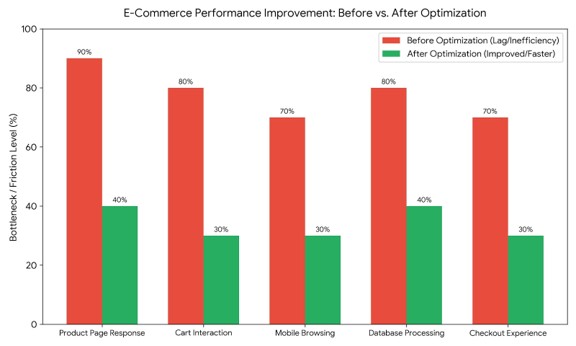
- There was a dramatic reduction in friction. A serialization optimization has helped reduce major site friction like the product page that is slow to respond. Initial lag level that dropped from 90% down to 40%.
- The scores of delay and jerkiness are significantly reduced from 70%-80% to a responsive 30%. The cart interactions and checkout processes become more fluid.
- Movement mobile & database processing is simple. Heavy mobile browsing and the inefficient processing of the database suck excessive speed which is further reduced to optimized levels of 30% and 40% respectively.
Selecting the Appropriate Approach to Optimization
Recognizing a store’s actual performance problems is step number one. Owners of business ignore any fixes that are generic in nature just because it fixes a different website. Different WooCommerce settings.
Begin by examining the customer journey. Review the homepage and the category, product, cart, account, and checkout pages. Issues can arise during specific activities only.
We must now prioritize the improvements based on their impact. A small visual resource may be less essential than a plugin that makes redundant database requests. First, action on meaningful bottlenecks should be.
A practical review could involve:
- Kids are sold as pets as puppies.
- Requirements to Check Extensions Performance Impact.
- Assessing health of hosting, caching, database.
- Testing every major purchase step after changes.
Businesses should think about future growth. A retail location anticipating increased items or visitors requires a scalable strategy. Fixes that work well when usage is low may fail when usage is high.
The strategy must include maintenance within it. Later performance can be affected by plugin updates, new integrations, and extra media. Monitoring helps identify problems before they become serious.
The most optimal approach both safeguards speed and functionality. Making a performance score better often results in the removal of potentially useful ecommerce features. This can lead to harm for customers. Enhancements should assist authentic shopping behavior.
Making Your WooCommerce Store Faster and More Reliable
The performance of the shop has impact on the customer journey. When shopping online, consumers today expect web pages to respond instantly to their every action. When interactions happen slowly, they can interrupt that process.
Using WooCommerce Speed Optimization Services, businesses detect technical bottlenecks and improve their store supporting systems. The most robust procedure simultaneously evaluates images, code, plugins, databases, hosting, caching, and checkout activity.
Performance enhancement should also remain realistic. A store doesn’t have to take off valuable features to get faster. Every feature should work optimally, not the other way.
Maintenance is also crucial since the WooCommerce environments are changing. New products, updates, integrations, and campaigns can affect Performance slowly. In the end, a faster store delivers a more reliable experience for both users and admins. With solutions such as Shartor, WooCommerce can become a stronger platform for long-term online growth when speed, stability and ecommerce functionality remain balanced.

Shartor shares practical ideas around websites, SEO, branding and digital growth.