


Top IT Consulting Strategies for Online Business Growth
[ux_html] As an online business grows, small IT problems can become costly. Orders may need to be entered twice. Staff may struggle to find customer records. A busy sales period…
As an online business grows, small IT problems can become costly. Orders may need to be entered twice. Staff may struggle to find customer records. A busy sales period may expose gaps in your website or support process.
The right IT consulting strategies start with these everyday problems. A consultant helps you decide what to fix, which tools to use and how to measure progress. This guide covers five areas to review, how to compare your options and what to ask a consulting partner.
Why IT Consulting Matters for Online Business Growth
A useful IT plan links each proposed change to a business need. For example, better stock updates may reduce order errors. A shared enquiry system may help staff reply sooner.
Start by listing the tasks that cause delays, extra costs or customer complaints. Then rank them by their effect on the business.
| IT Consulting Area | Business Question to Answer |
|---|---|
| Digital Strategy | Which technology changes will support our main goals? |
| Cloud Integration | How should staff access shared files and business tools? |
| Cybersecurity | Where are our data, access and recovery risks? |
| Automation | Which repeated tasks can we simplify safely? |
| Data and Reporting | What information will help us make better decisions? |
Different goals need different work. If search visibility is a priority, include SEO services alongside website improvements. If staff spend hours copying data, review how your systems share information.
Five IT Consulting Strategies to Prioritize
1. Build Systems That Can Handle Growth
Review how your website and business tools cope when demand rises. Check hosting limits, payment steps and the flow of data between systems. Look for a weak point before adding more tools.
For example, an online store should check whether new orders update stock correctly. A service business may need a clearer way to assign enquiries to staff.
2. Strengthen Security and Recovery
Review user accounts, software updates and backups. Give each person access based on their role. Remove access when it is no longer needed.
Tools such as encryption help protect information, but staff habits matter too. Train your team to spot suspicious messages and report problems. Test that important data can be restored from backups.
3. Choose Cloud Tools With a Clear Purpose
Cloud tools can support shared work and remote access. Before moving, check whether a service fits your existing software, budget and data needs.
Compare the full cost, including setup, staff training, storage and ongoing fees. Test one workflow first. Confirm that your team can use it before moving more of the business.
4. Use Data to Guide Decisions
Choose a small set of measures that match your goals. These might include completed orders, qualified enquiries, reply times or time spent on admin.
Check that the data is recorded consistently. Compare results over similar periods and note other changes, such as a new campaign. This helps you judge what is working.
5. Automate Repeated Tasks
Start with a task that has clear rules and happens often. Examples include order alerts, appointment reminders and sending enquiries to the right person.
Write down the steps before automating them. Decide what should happen when information is missing or a task fails. Test both normal cases and exceptions before using the process widely.
Compare IT Options Against Your Business Needs
The newest tool is not always the best fit. Your choice should reflect how your team works, what customers need and what you can maintain.
| Option | What It Involves | What to Check |
|---|---|---|
| On-Site Systems | Hardware and software managed at your premises. | Setup costs, maintenance, backups and staff capacity. |
| Cloud Platforms | Services accessed online and managed with a provider. | Ongoing fees, access controls, support and data export. |
| Hybrid Setup | A mix of on-site systems and cloud services. | Data sharing, clear responsibilities and support needs. |
Ask for a comparison that explains the costs and limits of each suitable option. Include a plan for moving data and keeping daily work running during the change.
How to Choose an IT Consulting Partner
A good proposal should explain the problem, the work involved and how success will be checked. Use the points below to compare potential partners.
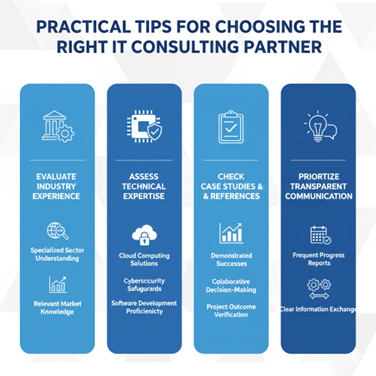
Evaluate Relevant Experience
Ask about projects with similar needs. A consultant should understand your order process, customer journey or staff workflow. Look for examples that relate to the problem you want to solve.
Assess Technical Skills
Match the team’s skills to the project. Ask who will handle the work and which parts need outside support. Confirm how the proposed tools will connect with your current systems.
Check Case Studies and References
Ask what changed, how results were measured and over what period. A useful case study explains the starting point and the work completed. Client references can also help you assess support and communication.
Agree on Clear Communication
Set a schedule for updates and name a contact on each side. The proposal should state what is included, what costs extra and how changes are approved.
Before starting, confirm:
- The tasks, owners and expected delivery dates.
- The total cost and ongoing fees.
- The checks needed before launch.
- The staff training and support included.
- Who controls accounts and can export business data.
Turn Your IT Strategy Into a Practical Plan
Choose one priority and record its current performance. Agree on a small first project, test the result and review it with your team. Use what you learn to plan the next stage.
At Shartor, the aim is to connect technology decisions with practical business goals. Explore Shartor’s services to discuss the systems, website or workflows you want to improve.
A clear plan gives your team a shared goal. Regular checks help you keep useful changes and address problems before expanding the work.

Shartor shares practical ideas around websites, SEO, branding and digital growth.